Posts

Interview preparation for APPS DBA’s

Before going to the interview prepare the below concepts. It will be easy to crack the interview. Application:- Upgradation Click hear Cloning Click hear Patching Clickhear Migration Log file location Concurrent Manager Clickhear Database:- Database Architecture  Clickhear Datagurad ASM,RAC Database Patching 11g,12c,19c New features OCI Instance creation PDB DB cloning and pdb instance creation   Performance Tuning:-  AWR ADDM ASH Sqltrp Concurrent manager and program slowness Find execution Plan change and pin best plan Cloning issues Basic day-to-day troubleshooting activity Finally search in google and study the current interview questions  à Click hear

How to assign concurrent particular concurrent program to concurrent manager in R12.2

Image
Concurrent à Programs à Define Query the particular concurrent program and check the request column and assign the concurrent manager in type column.

Oracle Apps Architecture Software component in R2.2

Image
Desktop Tier Sun (1.6)   java run time environment Java Virtual machine (JVM)   J2SE Plug-in Application Tier Oracle HTTP server (OHS) Oracle weblogic server (WLS) 11g basic 10.3.6 Developer 10.1.2 APPL_TOP COMMON_TOP INST_TOP Database Tier Oracle 11g Enterprise Edition Rac and ASM

Overview of SYS and SYSTEM Users in Oracle

Basically sys and system user called database administrator users The users are created during database installation Both users are automatically granted the DBA role SYS User Sys user can perform all admin operations Owner of the database and data dictionary All base tables and views of the database and dictionary’s stores sys schema When connecting the sys user. Its should be made the sysdba or sysoper privileges Connect sqlplus / as sysdba Sysdba and sysoper users to perform high level of admin tasks Ex : Backup and recovery Startup and shutdown Alter database open/mount Alter database Archivelog/Noarchivelog   SYSTEM User Owner of the additional internal tables and views System user perform all admin tasks except DB upgrade, backup and recovery Default password is manager They contain administrative information used by the oracle tools. Connect syatem/manager Note: For security reasons the de...

How to enable trace and generate TKPROF in concurrent program in R12.2

Image
Go to System Administrator à Concurrent à Program à Define Search the concurrent program name Click the Enable trace check box and save the concurrent program   Enable Debug from concurrent profile level Navigate to profile -> System Query "Concurrent: Allow Debugging" profile Set profile to "Yes" This should be set in site level. Submit the program Run the below sql query  under APPS User Select concurrent_program_name from fnd_concurrent_programs where enable_trace='N'; TKPROF Below query will provide the process id Select oracle_process_id from fnd_concurrent_requests where request_id=<Request_ID>; Below query will provide the trace file location select value from v$diag_info where name='Diag Trace'; select value from v$parameter where name='user_dump_dest'; Collect the trace file from user_dump_dest location and generate tkprof using below command tkprof <filename>.trc <filename>.txt sys=no  sort...

How to start and stop the oracle managed servers oacore_server1,oafm_server1,etc..

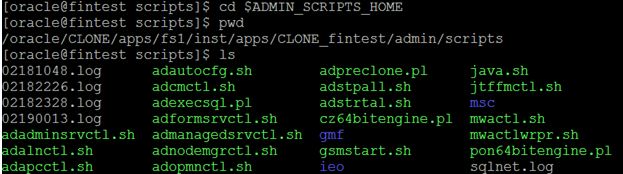
Step1 : source the EBSapps.env file Step2 : Go to $ADMIN_SCRIPTS_HOME Step 3 : sh admanagedsrvctl.sh stop oacore_server2              sh admanagedsrvctl.sh start oacore_server2              sh admanagedsrvctl.sh status oacore_server2 Ex : sh admanagedsrvctl.sh status oacore_server1 You are running admanagedsrvctl.sh version 120.14.12020000.8 Enter the WebLogic Admin password: oacore_server1 is running. admanagedsrvctl.sh: exiting with status 0 admanagedsrvctl.sh: check the logfile /oracle/PROD/apps/fs1/inst/apps/PROD_prod/logs/appl/admin/log/adoacorectl.txt for more information ... How to start and stop services in R12.2 Click hear

R12.2 startup and shutdown scripts

Image
In this post covered frequently using start and stop scripts in EBS EBS Start and stop scripts located at "$ADMIN_SCRIPTS_HOME" individual scripts also availabe for start and stop for particular services.  adstrtal.sh This scripts is used to start all EBS services like middle tier, concurrent tier,forms,ect.. This scripts requires APPS and Weblogic Password  Log file Location : $INST_TOP/logs/appl/admin/log/adstrtal.log adstpall.sh   This scripts stop the all EBS services like middle tier, concurrent tier,forms,ect.. This scripts requires APPS and Weblogic Password  Log file Location : $INST_TOP/logs/appl/admin/log/adstpall.log adnodemgrctl.sh   This script is used to start and stop the Node Manager services. It is known as root services and is a component of the fusion middleware services introduced in R12.2. Starting and stopping this services no impact on normal application operations but it will affect weblogic maintenance activity This scri...