Posts

Showing posts with the label R12.2 Performance Tuning

How to enable trace in User level in R12.2
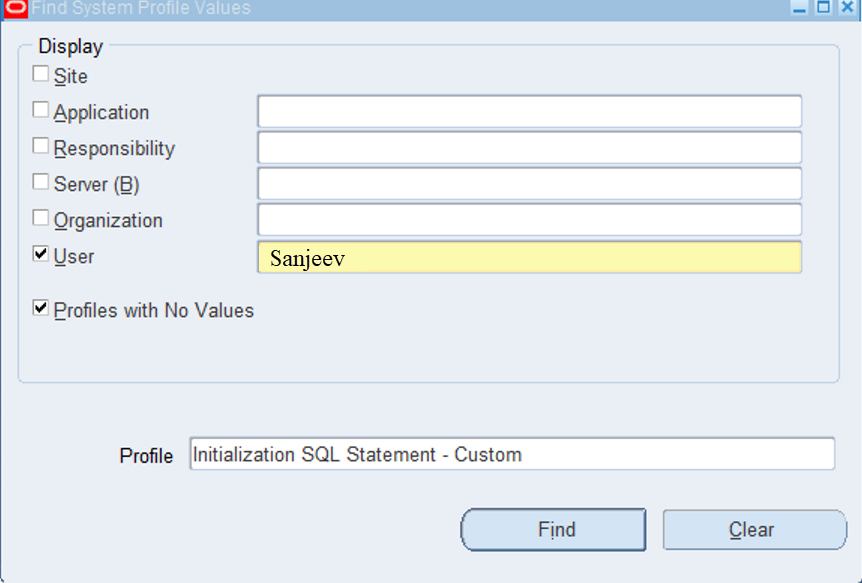
Image
Step 1: Go to system administrator à Profile à system Enter username and Profile Option “ Initialization SQL Statement – Custom ” and search Step 2: Just replace the User for below command and paste the command   Begin fnd_ctl.fnd_sess_ctl('','','TRUE','TRUE','LOG','ALTER SESSION SET TRACEFILE_IDENTIFIER='||'''' ||<Username>|| ''''||' EVENTS='||''''||'10046 TRACE NAME CONTEXT FOREVER, LEVEL 12'||'''');End;   Example: Begin fnd_ctl.fnd_sess_ctl('','','TRUE','TRUE','LOG','ALTER SESSION SET TRACEFILE_IDENTIFIER='||''''|| Sanjeev ||''''||' EVENTS='||''''||'10046 TRACE NAME CONTEXT FOREVER, LEVEL 12'||'''');End; Trace File Location: set line 1000 SQL> select * from v$diag_info;

Overview of Concurrent Processing - Purge Concurrent Request program

Concurrent programs log and output files are maintenance polices in OS level When we plan to start maintenance activity for those log files the purge concurrent request program come into picture based on the information Purge concurrent request using below tables. FND_CONCURRENT_REQUESTS This table contains a complete history of all concurrent requests. This table should ideally be kept at around4 - 5k records and should be regularly purged as part of normal 'housekeeping' by running the standard FNDCPPUR program. FND_RUN_REQUESTS When a user submits a report set, this table stores information about the reports in the report set and the parameter values for each report. FND_CONC_REQUEST_ARGUMENTS This table records arguments passed by the concurrent. FND_DUAL This table records when requests do not update FND_CONCURRENT_PROCESSES This table records information about Oracle Applications and operating system processes. FND_CONC_STAT_LIST This table col...

Concurrent Manager Performance tuning R12.2

Concurrent manager process flow FNDSM is initiate the concurrent manager in OS processer. Then start the database session and read the settings. Update the fnd_concurrent_processes and fnd_concurrent_queues tables Build SQL for quiring the request queue. Execute the sql to request concurrent manager. Checking for Sleep time seconds, Pending requests Checking the “Cache size” number of requests into the execution cache. Execute the request from the execution Queue. Update the status code of the concurrent request. Execute the request and update the status code. If Concurrent Managers are not starting Check Concurrent Manager log files Click here Check the database alert log for any space issue. Check the application tier filesystem and Middle tier file system space and /tmp directory space. Check application listner Running/Not adalnctl.sh status Run the adcmctl script with debug option will get some idea where its failed sh -x adcmctl status apps/appspw Check if FND...

How to troubleshoot long running concurrent request in R12.2

We frequently encounter issues with concurrent programs running long and concurrent requests not picking up jobs. These problems are often expected from the development and functional team we need to address this issue To solve this, we should take the following steps: Collect below basis level of information to development team 1 Oracle seeded program/Custom program? 2 How much time it used earlier? 3 Is there any recent code change done in concurrent program? 4 Is this program fetching higher data compare to last run? 5 Does this job running any specific time/ It can be run any time? 6 Does this job fetching data using DB link? 7 Does the problem happen on both the test and production instance?   Troubleshooting Steps for Concurrent Requests Check for Locks and Blocking sessions Identify if the request is running but blocked by database locks/Blocking sessions. Use DBA tools or queries to identify and release locks if necessary. Review Parameters and Data ...

JSP Compilation in R12.2

Sometime after upgrade, cloning and patching front end login page is not opening showing blank page or showing “ java.lang.StringIndexOutOfBoundsException ” error. This issue was occurring due to cache is not cleared after upgrade/Cloning JSP Compilation steps Step 1: Shutdown the application services Step 2: Take backup for the _Page(class file) folders $ cd $OA_HTML/WEB-INF/classes $ ls -lrt $ mv _pages _pages_bkup<date> a $ cd $OA_HTML/WEB-INF/classes $ ls -lrt $ mv _pages _pages_bkup<date> $ mkdir _pages $ ls -lrt Step 3: Run the below command $ perl $FND_TOP/patch/115/bin/ojspCompile.pl --compile --flush -p 99 Step 4: Start the application and clear browser cache. After completed the JSP compilation home page not coming please clear the image and style sheet cache also Cabo Images and style sheets can be corrupted or out of sync in the cabo caches, you may need to clear the related directories after backup: Step1: Shutdown the services...

How to Clear OACORE WARNING WebLogic Stuck Threads in Oracle EBS R12.2

Overview In Oracle E-Business Suite R12.2, sometimes the OACORE managed server goes into WARNING state in the WebLogic console. This usually happens because of stuck threads. A stuck thread means a request is running for a long time and not completing. When this happens: OACORE server shows WARNING status Users may face slow performance Some pages may take a long time to load As an Oracle Apps DBA, we must identify the stuck thread and the related database session. Common Reasons for Stuck Threads Long running SQL queries Blocking sessions Large data processing Unoptimized queries Heavy concurrent requests Step 1 – Check WebLogic Console Login to WebLogic Admin Console. http://hostname:7002/console Navigate to: Environment → Servers Example: oacore_server7 WARNING Step 2 – Check Stuck Threads Navigate to: Environment → Servers → oacore_server → Monitoring → Threads Find ECID value from stuck thread. ECID-Context: 1.005ZMg...