Posts

How to run Gather Schema Statistics in R12.2
Image
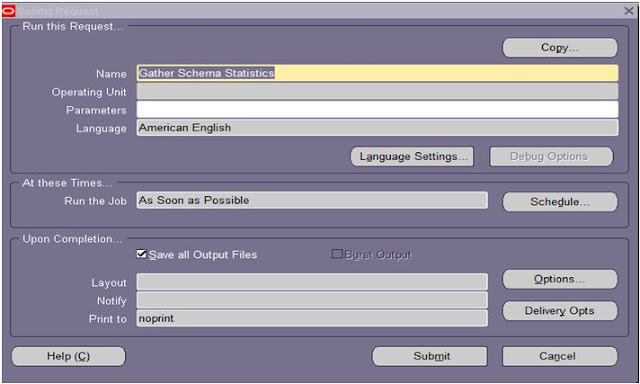
What is Gather Schema Statistics? Gather Schema Statistics program generates statistics that quantify the data distribution and storage characteristics of tables, columns, indexes, and partitions. The cost-based optimization (CBO)  uses these statistics to calculate the selectivity of prediction and to estimate the cost of each execution plan. Why Run the Gather Schema Statistics? When Data is update, insert, delete in table of user end Like (Technical User ,Finance User ,Ect) It become necessary to run the Gather Schema Statistics It’s recommended to Run GSS in Weekly Once or twice. How to run Gather Schema Statistics? Login application with sysadmin user Submit Request Window Navigate to: Concurrent > Requests Enter the parameters This can be run for specific schemas by specifying the schema name or enter ‘ALL’ to gather statistics for every schema in the database Submit the Gather Schema Statistics program Parameters: S...
how to view content of spfile

Image
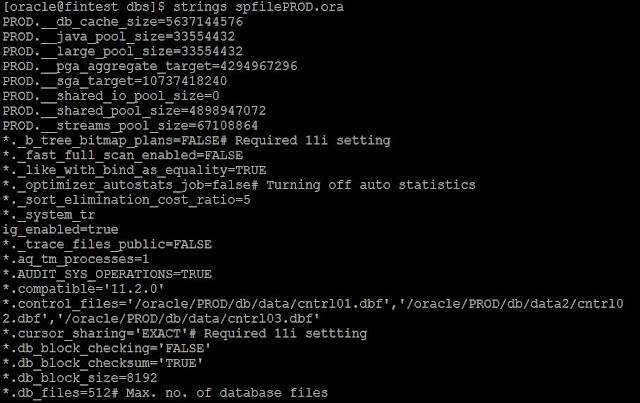
Basically SPFILE is the binary file View the content is using OS command The strings command returns each string of printable characters in files. Its main uses are to determine the contents of and to extract text from binary files (i.e., non-text files). Characters are the basic symbols that are used to write or print a language strings spfilePROD.ora

Oracle Temporary Tablespaces

Image
Temporary Tablespaces Using for sort operations Cannot contain any permanent objects Locally managed extents recommended. Creating a Temporary Tablespace SQL> Create Temporary Tablespace TEMP_NEW                       Tempfile '/u01/oracle/VIS/data/temp_new01.dbf'                       Size 500M; Altering a Temporary Tablespace You can issue the ALTER TEMPORARY TABLESPACE statement to perform various temporary tablespace management tasks, including adding a tempfile to grow a temporary tablespace. Below is an example showing how you can make the temporary tablespace larger   How to add New temp file in temp tablespace?   SQL> Alter tablespace TEMP_NEW Add Tempfile '/u01/oracle/VIS/data/temp_new02.dbf'  Size 10m; How to resize  tempfile? SQL> Alter Database Tempfile '/u0...

Oracle EBS Application Cloning Basic

Image
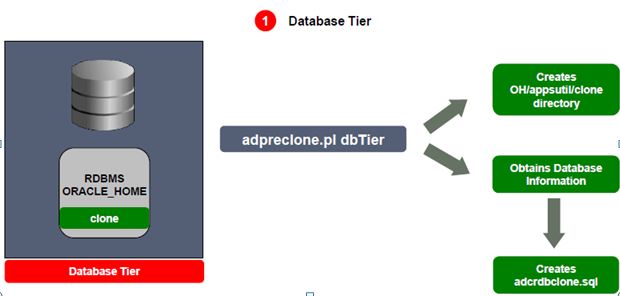
Before start to apps cloning. we must know the below basic steps. Cloning is the process used to create a copy of an existing E-Business Suite System  Rapid Clone Preparing the source system Copy of database and applicatation node file system Configuring Target system Preparing the source system $ perl adpreclone.pl Usage Apps Node: perl adpreclone .pl appsTier | atTechStack | fmwHome | wlsConfig | ohsConfig |appltop Database Tier: perl adpreclone.pl dbTier | database | dbTechStack Log File Location $ORACLE_HOME/appsutil/log/SID_HOSTNAME/StageDBTier_MMDDhhmm.log $INST_TOP/admin/log/StageAppsTier_MMDDhhmm.log   Preparing the Database Tier:-  perl adpreclone.pl dbTier  It will create the clone directory $ORACLE_HOME/appsutil/clone/directory Obtains Database Information Creates adcrdbclone.sql   Prepare the Application Tier cd $ADMIN_SCRIPTS_HOME perl adpreclone.pl appsTier There are two stages to apps Tier:...

FNDCPASS Utlity in R12.2

Image
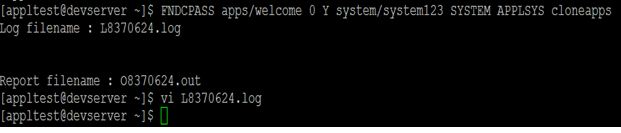
Changing passwords frequently helps ensure database security, Oracle Applications provides a command line utility, FNDCPASS, to change/reset Oracle Applications schema passwords. This utility changes the password registered in Oracle Applications tables, changes the schema password in the database and can also change user passwords. Key Considerations: Autoconfig Requirement: After changing the APPLSYSPUB or GUEST user passwords, need to run the autoconfig. Pre-Change Preparations: Shutdown Applications: Before changing the APPS password, make sure to shut down the application. Backup Critical Tables: Perform a backup of the FND_USER and FND_ORACLE_USER_ID tables. If anything goes wrong during the password change process, you can restore these tables to revert to the previous state. Restrictions: The system and sys user passwords cannot be changed using the FNDCPASS utility. Users not registered in the FND metadata tables cannot be modified using this utility....

Control files multiplexing

Image
What is Control File: It is small binary file It is required for database during startup operations Each database associated only one oracle database Control File Contents: DB Name and identifiers Tablespace names Names and location of data files and redo log files Check point information Redo log and archive log information Backup information Multiplexing the control file: Check the database running SPFILE (or) PFILE. My  DB is running SPFILE Multiplexing Control file DB running in SPFILE Step 1: Check the control file location Step 2: Alter the SPFILE Alter system set command is alter the spfile to including a list of control files to be used Step 3: Shutdown the database Shutdown the database in order to create additional control files on the OS level Step 4: Create additional control files using OS copy command Step 5: Start the database When the DB started spfile will b...